I’ve released a GitHub look-and-feel theme for Gitea: https://github.com/mechiland/gitea-theme-github
It’s built from GitHub’s open-source design system rather than by recolouring Gitea: colors, spacing, type and shadows come from Primer Primitives, icons are Octicons, and controls follow the Primer component specs. No GitHub logos are shipped; the Gitea logo stays.
- Three themes:
github-auto(follows the OS),github-light,github-dark - One package for Gitea 1.27.x and 28.x (tested on 1.27.3 and 28.1.0). Templates pick the right variant from the running Gitea version, so you can install it before upgrading to 28 and keep it afterwards.
- Gitea 28’s new UI (toasts, site banners, quick repo switcher, Actions job queue, diff file filter…) is styled too.
- MIT licensed.
Install: download the release package, extract it into your custom directory (/data/gitea in the Docker image), add the themes to [ui] THEMES, restart once, then pick GitHub under Settings → Appearance. Full steps are in the README.
Repository home (left: Gitea default, right: this theme):
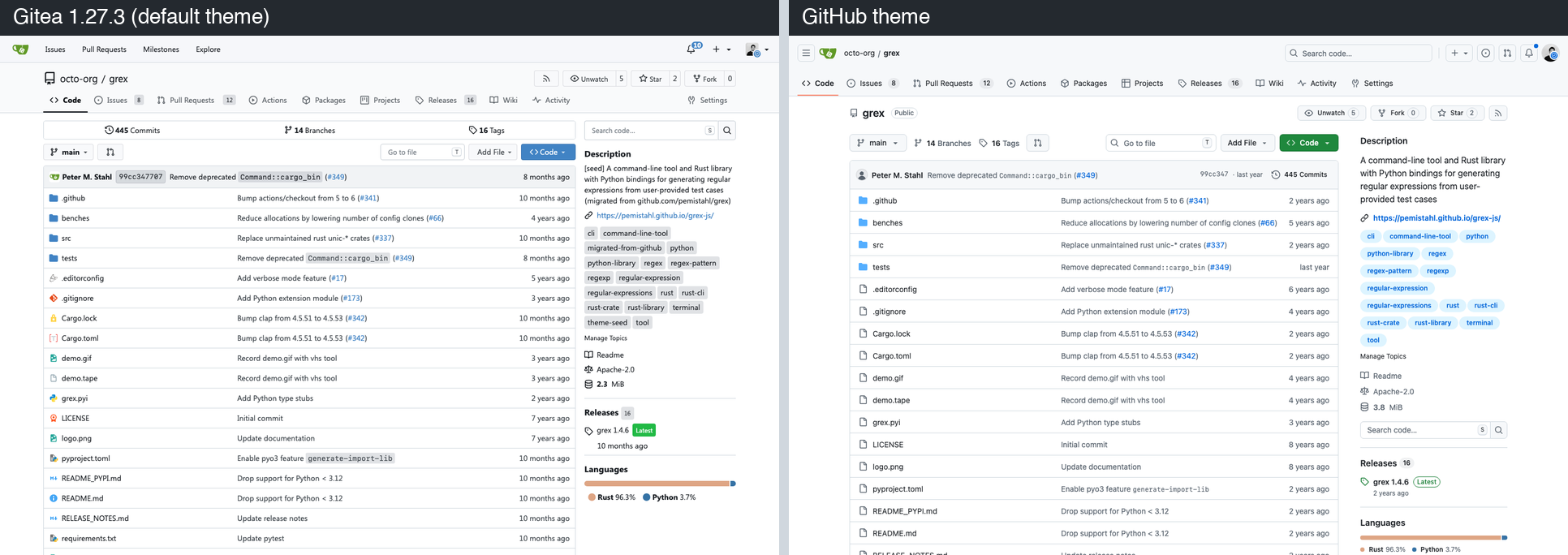
More screenshots (issues, dark mode, PR diff, settings) are in the README. Feedback and bug reports are welcome on GitHub issues.